Catalog Your Sneaker Collection
A sneaker collection app should do more than list your pairs — it should show them. TrophyShelf catalogs each pair from your photos (AI fills in the model, colorway and year), tracks condition from deadstock to beat, and gives your whole rotation a shareable shelf where view counts tell you which grails people actually stop for.
Catalog pairs the way sneakerheads actually think
Sneaker collections split naturally: rotation, deadstock, and grails. Make each its own collection — the shelf tile shows a live pair count, and grid view lays out every pair as its photo with condition badged on the corner.
Photograph laterals, medials, soles, box labels. The box label shot matters twice: AI autofill reads the model, colorway, size and year from it, and it's your authenticity anchor if you ever sell.
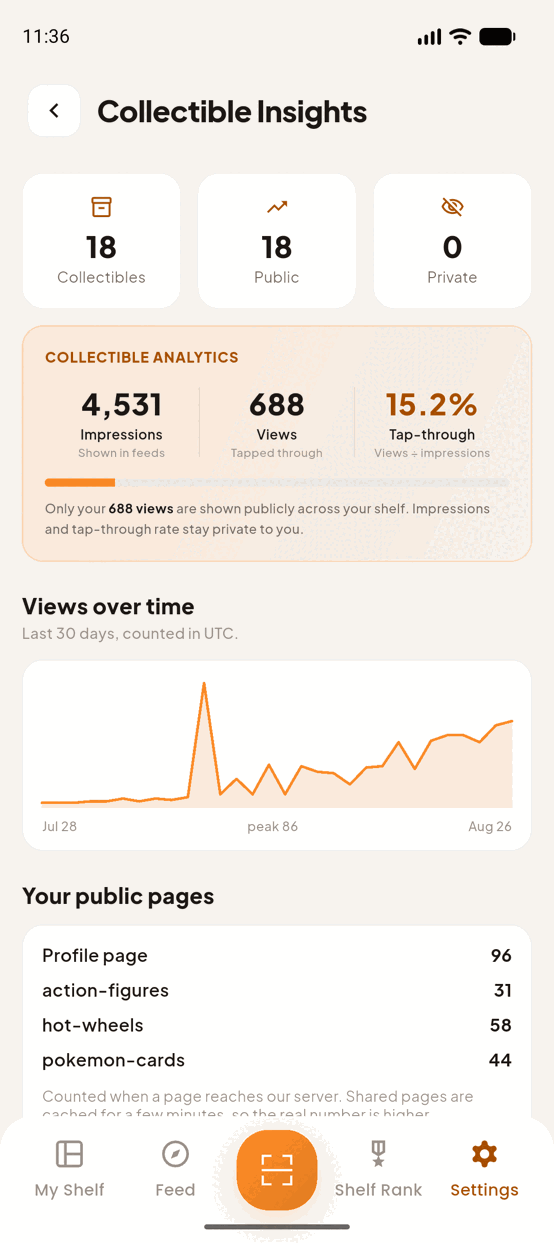
Views are the new Wall
Public pairs appear on your shelf and in the Discover feed with view counts. Insights ranks your most-viewed sneakers — on a real shelf, the Jordan 1 Chicago at 210 views versus the Dunk at 178 settles which pair leads your next post.
Keep unworn investments private and share them by direct link only when a buyer asks; flip your rotation public for the feed.
The fields a pair actually carries
Most collection apps give you a name, a photo and a notes box. TrophyShelf resolves each collectible against a schema for its type, so a pair of sneakers gets asked sneaker questions — and the type you want is called Shoes.
What does it record for a sneaker?
Seven fields of its own, plus condition, which every type carries:
- Brand name — Nike, adidas, New Balance.
- Model / silhouette — Air Jordan 1, Samba, 990v6.
- Colorway name — the part sneakerheads actually say out loud. Chicago. Bred. Panda.
- Size — free text, so you can write US 10, UK 9 or EU 44.
- Release year.
- Gender — Men’s, Women’s, Unisex, GS or Youth.
- Release type — see below, because this is the interesting one.
- Condition — on every collectible in the app, not just shoes.
Why is “Release type” its own field?
Because for sneakers it is most of the story. The options are General release, Limited, SNKRS exclusive, Collab, Retro, Sample and Player exclusive (PE).
Two pairs can share a brand, a silhouette, a colorway and a year and still be nothing like each other — one a general release that sat on shelves, the other a PE that never retailed. Putting that on a field rather than burying it in a description means you can see it on the shelf, and so can anyone you send the link to.
What does the AI fill, and what stays mine?
Photograph the pair with the box label in frame and the autofill reads the brand, the model, the colorway and the year off it. Those are printed facts, and a photograph is enough to recover them.
It will not guess condition. That is deliberate and enforced in the prompt: condition is a judgement about a specific pair in a specific state, it moves the value more than any other field, and a model inventing “deadstock” from a flattering photo would be worse than leaving it blank. You set it, every time.
Which size scale should I use?
Whichever you think in — the field is free text for exactly that reason. Pick one and stay with it across the shelf. A collection that mixes US 10 and EU 44 reads fine to you and badly to the person you sent it to.
Set up your sneaker shelf in TrophyShelf
- Create Rotation, Deadstock and Grails collectionsPick Shoes in the type picker — there is no entry called “sneakers”, and Shoes is the one carrying the sneaker fields. The 👟 tile is applied automatically.
- Shoot each pair + the box labelLaterals, medials, soles, and the label. Up to 10 photos per pair.
- Confirm AI-filled model and yearModel, colorway and year pre-fill from your photos; set condition from DS to well-worn.
- Go public with the heatFlip your best pairs public and watch the view counts; keep investments private.
- Share your rotationOne link shows the full shelf in any browser — no app needed on the viewer's side.
Pro tips
Questions
What should I photograph for each pair?
Laterals, medials, soles and the box label — up to 10 photos per pair. The label is the one that matters twice.
Can I keep investment pairs off the feed?
Yes. Keep unworn pairs private and share them by direct link only when a buyer asks; flip the rotation public for the feed.
Does it track condition?
Yes, from deadstock to well-worn, and the condition shows as a badge on the corner of each tile in grid view.
Ready to put it on the shelf?
Free on iOS & Android · Unlimited collections · 15 AI autofills a month · No credit card.
Start your shelf →