Moving a Collection Off a Spreadsheet
Most collection spreadsheets die in the first month, and the reason is structural: a grid asks you to describe visual objects in text, at a keyboard, in columns you had to guess at before you knew what you were collecting. Here is what replaces each part of it — and the one thing a spreadsheet still does better.
Why the spreadsheet stops
Almost every collector starts in a spreadsheet, and almost every one of those spreadsheets stops being updated inside a month. It is not a discipline problem.
A spreadsheet asks you to describe an object in text, at a keyboard, away from the object. Every new collectible is a row of typing, and the columns you chose in week one stop fitting by week three — because a comic needs an issue number, a sneaker needs a colorway, a coin needs a mint mark, and one grid cannot be all three without becoming forty mostly-empty columns.
There is no import, and that is the honest answer
TrophyShelf will not read your CSV. There is no importer, and pretending otherwise would waste your afternoon before you found out.
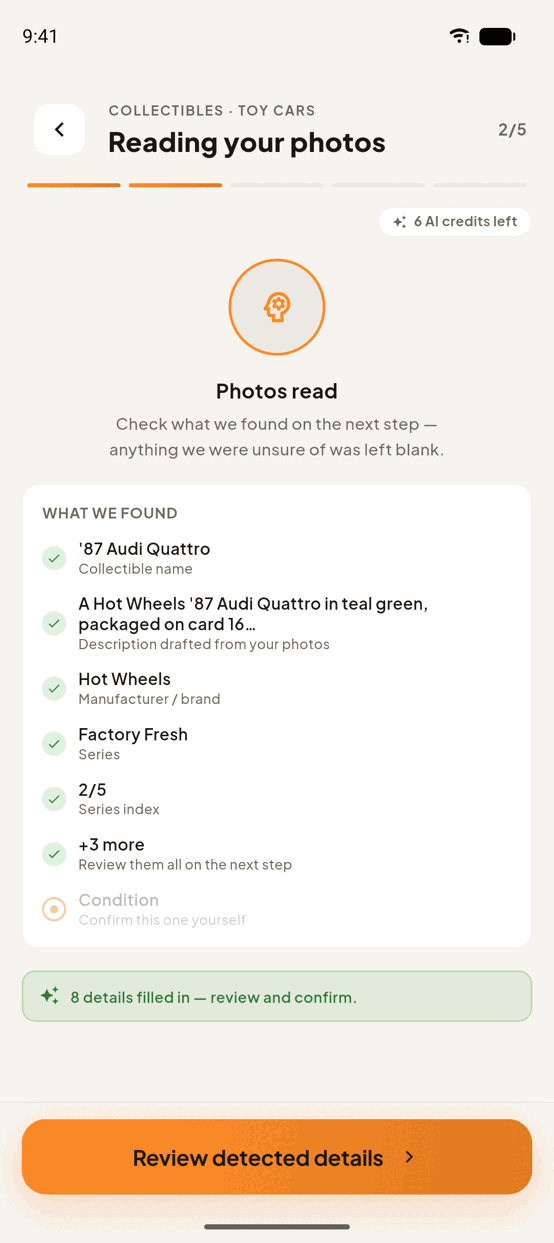
What replaces it is that re-capturing is faster than pasting. You photograph the piece; the AI fills the name, the description and the fields that type carries. For most collectibles that is a few seconds of work against a minute of transcription — and at the end you have photographs, which the spreadsheet never had and which are the part an insurer, a buyer or a future you actually wants.
📌 Keep the spreadsheet. Nothing here needs you to delete it, and for a large collection the sane order is to work through it a shelf at a time rather than in one sitting.
What replaces your columns
Typed fields instead of guessed ones
Instead of one grid for everything, each collectible resolves against a schema for its type — 56 of them. A Pokémon card is asked for its set, card number, edition and language; a watch for its reference number, movement and caliber; a LEGO set for whether the bags are still sealed.
You never design the columns, and you never carry a column that does not apply.
Photographs instead of descriptions
Up to ten per collectible. The thing a spreadsheet is worst at — showing you which of your three copies this is — becomes the primary record, and the fields hang off it.
The fields a spreadsheet gets right, kept
Paid, Est. value and Where acquired are real fields, not description text. So is condition. If your sheet had those columns, they have somewhere to land that can be read back and sorted.
What it will not do that a spreadsheet does
Arithmetic. There is no formula bar, no pivot, no column of sums — if your spreadsheet's whole purpose is totalling what a collection cost, keep it for that. This is a catalogue of objects, and the honest comparison is a photo album with fields, not Excel with pictures.
Do it in TrophyShelf
- Start with one shelf, not the sheetPick a physical shelf or one tab of the spreadsheet. A collection migrated in one sitting is a collection abandoned in one sitting.
- Create a collection and pick the typeThe type decides your fields, so choose the specific one — Pokémon rather than a generic card, LEGO rather than toys.
- Photograph, do not transcribeShoot the piece and let autofill read the printed facts. Your spreadsheet row is now a cross-check rather than a source.
- Move the three columns worth keepingPaid, Est. value and Where acquired are real fields. Copy those across by hand — the AI deliberately will not touch them.
- Leave the sheet alone until you are doneDelete nothing until the shelf is catalogued and you have looked at it. There is no undo for a spreadsheet you closed without saving.
Ready to put it on the shelf?
Unlimited collections · 15 AI autofills a month · No credit card.
Start your shelf →